
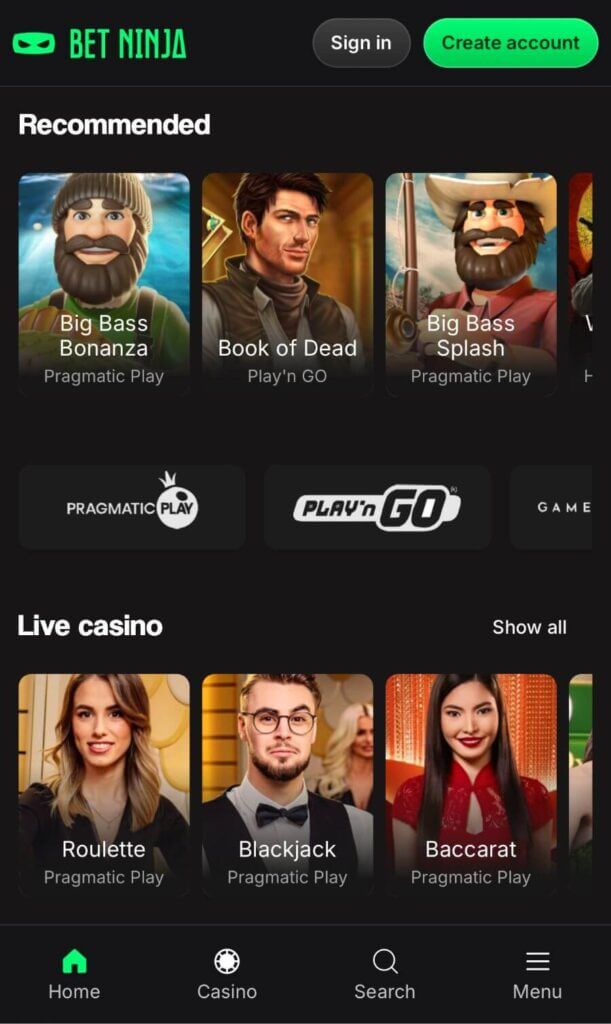
Using a mobile casino app ought to be intuitive, not like a puzzle needing a manual. The Betninja Casino app for Canadian players is built around a streamlined dashboard that puts games, banking, and account tools within two taps of the home screen. Every element of the interface has been crafted for quick orientation, whether a user is signing in for the first time or returning to claim a daily bonus. This guide details the complete layout of the application, from the initial download to the deeper customization options that make the experience feel personal. By understanding the structure of the main menu, the game lobby filters, and the cashier section, Canadian users can spend less time searching and more time enjoying the titles they prefer. The app’s clean visual hierarchy, combined with responsive touch targets, ensures that even players who have less experience with gambling apps can orient themselves comfortably. The following sections break down every key navigation path, installation step, and compatibility detail so the Betninja Casino mobile experience becomes second nature.
Detailed Download & Install Guide for Android
Preparing Your Device
Before getting the Betninja Casino app on an Android device, Canadian users must adjust a single security setting to enable installations from sources outside the Google Play Store. The process starts by opening the device’s Settings application, moving to Security or Privacy, and locating the option named Install unknown apps or Unknown sources, based on the manufacturer. Selecting this option presents a list of browsers and file managers; the user ought to select the browser they plan to use for the download, such as Chrome or Samsung Internet, and flip the permission to Allow. This step is essential because the app is provided as a direct APK file from the official Betninja Casino website, a common practice for real-money gambling applications in Canada. The toggle can be set back off after installation for added security. Device manufacturers like Samsung, Google, and OnePlus may label these settings slightly differently, but the fundamental path remains consistent. Investing a minute to finish this preparation avoids frustrating interruptions during the installation and ensures that the APK file can be opened without error messages.
Install Procedure
As soon as the mobile is ready, the gambler goes to the proper Betninja Casino website using the cell web browser and clicks the prominent Android download icon. The website automatically recognizes the mobile kind and serves the appropriate APK download. After the download completes, a notification bar pop-up emerges; selecting it launches the installer. The gambler then goes through an sequential set of actions that the system presents clearly.
- Select the downloaded APK file from the notification bar or the file location.
- Review the app permissions required, which comprise storage authorization for buffering game files and network permission for live action.
- Press the Installation button and let for the progress bar to finish.
- Once ready, select Open to start the program or look for the Betninja Casino icon on the home screen.
The whole installation hardly needs more than two minutes on a steady Wi-Fi link. When a Play Protect message shows up, it is secure to select Install regardless, as the APK is cryptographically verified by the company and checked for safety. The app icon will bear the operator’s ninja emblem, and selecting it leads directly to the login or registration interface. Canadian-based gamblers who experience a parsing error should re-download the package, making sure adequate storage space is free.
6. Managing Payments and Payouts Using the App
Deposit Methods
The cashier section of the Betninja Casino app is available from the Account tab or the balance icon at the top of the screen. Canadian players are presented with a tailored list of payment methods that showcase the most reliable options in the country. Interac e-Transfer and Interac Online are highlighted, permitting near-instant deposits directly from a bank account. Credit and debit cards from Visa and Mastercard are accepted, and the app includes digital wallets such as MuchBetter, ecoPayz, and Neteller for those who prefer an extra layer of separation from their bank. The deposit interface is simple: after picking a method, the user types an amount in CAD, submits any bonus code they desire to apply, and completes the method-specific prompts. The app securely stores the last used payment method for faster repeat transactions but never displays full card numbers. Minimum and maximum limits are explicitly shown before the transaction is completed, and a green success screen appears with the updated balance within seconds. Live chat support is available directly from the cashier screen if any deposit does not to process.
Withdrawal Process
The withdrawal flow mimics the deposit interface in clarity but includes additional verification steps that are typical for Canadian-regulated platforms. After selecting Withdraw, the player chooses a method, typically the same one used for the deposit, in compliance with anti-money laundering policies. The app then prompts for the withdrawal amount and shows the pending time and any applicable processing limits. Before the request can be processed, the system reviews whether the account has been fully verified. If identity documents are needed, a direct link to the secure upload portal launches within the app, where users can upload a government-issued ID and a proof of address such as a utility bill. The verification status is displayed in the Account section, turning from orange to green once confirmed. Once the withdrawal is handled, push notifications notify the player on the status change from pending to completed. The entire history of deposits and withdrawals is available in the transaction log, sortable by date and type, giving Canadian players a comprehensive view of their financial activity.
The seventh Customizing Your App Journey with Configurations
Notification Settings
The configuration menu, navigated through the hamburger button or the the Account page, provides detailed management of the types of alerts the app produces. Canadian users can modify messages concerning deposit verifications, cashout authorizations, exclusive bonus deals, and real-time tournament notifications individually. This means a gambler can select to get only financial messages while muting marketing alerts, or the opposite, building a non-disruptive journey that observes personal limits. The app additionally provides a Quiet Hours feature that pauses all secondary alerts during a specified time frame, which is perfect for users who prefer not to be interrupted late at midnight. Changes to message options apply instantly and sync on all platforms on which the same profile is logged in. The app never require push messages as a requirement of use, and the initial permission prompt can be revisited at any time from within the preferences. This extent of personalization makes sure that the app stays a means for fun instead of a origin of unwanted disruptions.
Account Security Preferences
In addition to alerts, the settings section contains several safety-related options that Canadian gamblers should review. The player can update their passcode by inputting the current password and creating a new, complex string that fulfills the app’s strength indicator. Two-factor security can be activated, connecting the login to an authenticator app for an bonus login token. The app also presents a roster of active logins with device names, places, and date/time stamps, permitting the user to remotely sign off of any gadget they do not identify. A specialized Responsible Gaming area inside preferences provides direct entry to deposit caps, session time reminders, and self-exclusion options. These caps can be set daily, weekly, or every month and apply right away. The app presents these options in plain language, with connections to Canadian support agencies for those who seek further assistance. The entire settings architecture is crafted to give the gambler full agency over their playing environment, reinforcing the brand’s commitment to a safe and personalized experience.
4. Registration Process and Login Access
Registering a New Account
The account creation process inside the Betninja Casino app is designed as a mobile-optimized assistant that guides Canadian users through each field without confusing them. The Register button appears clearly on the authentication screen, and selecting it launches a series of clearly labelled screens. The first screen asks for basic personal details: legal name, DOB, and email address. The app utilizes live validation, so mistakes such as an invalid email format are flagged immediately with a soft red highlight. The next screen requests a Canadian address, postal code, and mobile number, with the province pick pre-populated in a selection menu that respects the standard Canadian abbreviations. The final screen sets up account access info, including a strong password and a selected currency, which is set to CAD by default for Canadian accounts. A check box for agreeing to the terms of service and affirming the legal gambling age is required before the Submit button is enabled. The whole procedure considers the user’s time, and the app does not ask for documentation at this stage, though validation will be necessary later for withdrawals.
Signing In and Biometric Authentication
Returning users can sign in using the email and password set established during registration. The login screen also provides a Remember Me option that retains the email in a secure manner, though the password must always be entered manually for security. A more convenient option present on supported devices is biometric login. After the first valid login, the app invites the user to enable Face ID or Touch ID, according to the device. Once enabled, the player can simply tap the biometric icon on the login screen, and the app verifies the identity in real time using the device’s stored biometric data. This functionality saves time and provides a layer of security, as the biometric scan or facial recognition is managed on-device and never sent with the casino’s servers. The app also offers a quick PIN option for members who prefer a numeric password. In the event of a forgotten password, the Forgot Password button initiates a secure email reset process that provides a one-time link within seconds. The whole verification system is designed to harmonize convenience with the rigorous security expectations Canadian members expect.
8. Accessing Bonuses & Loyalty Benefits via Portable
Finding Active Bonuses
The Offers tab, anchored on the bottom navigation bar, gathers each current offer offered to Canadian players in a single scrollable feed. The top page area displays a rotating banner highlighting the most valuable bonuses, including a matched deposit package or free spins for a newly released slot. Underneath that banner, each promotion is shown as a card including the bonus name, the wagering requirement, as well as a countdown timer on time-sensitive deals. Tapping a card expands it revealing the full terms & conditions, covering minimum deposit thresholds and eligible games. The application pre-fills the relevant bonus code as soon as a player clicks the Claim button, which redirects to the deposit screen where the offer already applied. That prevents the frustration with forgotten codes or copied text. A history tab within the promotions section lists all active & used bonuses, together with the progress for meeting wagering requirements. This transparency in this display enables Canadian players take informed decisions about what promotions to pursue and track their remaining playthrough balance immediately.
Loyalty Program Navigation

To players signed up in the Betninja Casino loyalty program, this app provides a dedicated progress dashboard reachable through the Account tab. The dashboard presents the current tier, the points accumulated, and the number of points needed to reach the next level. A visual progress bar renders the advancement path clear, and tapping it brings up a detailed breakdown of the perks linked with each tier, such as faster withdrawals, higher table limits, & personalized account management. The app also logs the points earned from each wager, so players can verify that their gameplay is being credited correctly. Periodic loyalty-exclusive promotions appear as notifications or as highlighted cards in the Promotions tab, and these get tagged with a loyalty badge to tell apart them from standard offers. This integration of the loyalty program into the mobile interface means that Canadian users don’t have to log into a separate website to check their status. The rewards experience is fully embedded within the same app they use to play, building a seamless loop involving playing, earning, & redeeming.
1. Comprehending the Betninja Casino Mobile App Interface
The primary home screen of the Betninja Casino app showcases a fixed bottom navigation bar that stays visible regardless of which section is active. This bar includes four primary icons: Home, Games, Promotions, and Account. Tapping any of these instantly shifts the content area without requiring a page reload, which creates a smooth, app-like feel that mirrors native iOS and Android performance. The central content area above the bar typically presents featured games, a scrolling banner highlighting current offers, and a compact widget showing the player’s balance and active bonus progress. The top of the screen includes a hamburger menu on the left and a search icon on the right. The hamburger menu unfolds to reveal secondary shortcuts to banking, responsible gaming tools, support, and settings. This layout guarantees that the most frequently used functions—game selection, deposits, and promotions—are never more than one interaction away. The consistent placement of elements across all tabs minimizes the learning curve and helps Canadian users move seamlessly between casual browsing and focused gameplay.
The overall colour palette and typography choices reinforce the app’s readability. A dark background with high-contrast white and gold accents makes category labels and game titles pop without straining the eyes during extended sessions. Touch targets are sized generously, tackling the common frustration of mis-tapping on smaller screens. The games section, for example, utilizes large thumbnails with clear provider logos, while the cashier buttons are deliberately oversized to reduce input errors. Notifications and pop-ups are confined to a non-intrusive top banner that does not block the main navigation bar. This design philosophy matters for Canadian players who appreciate efficiency and clarity. The app sidesteps cluttering the interface with flashy animations that distract from the core purpose. Instead, subtle transitions direct the eye toward the next logical action, whether that is claiming a reload bonus or verifying a withdrawal request. The overall impression is one of calm professionalism, which matches with the regulatory expectations of the Canadian market and the brand’s commitment to user trust.
3. Step-by-Step Setup and Configuration Guide for iOS
Official App Store Download
For iOS users in Canada, downloading the betninjacasino apk app is a easy process that does not need any device configuration changes. The user launches the App Store on their iPhone or iPad, types “Betninja Casino” into the search box, and finds the official app identified by the developer name and the distinctive logo. Tapping the Get button starts the download using Face ID, Touch ID, or the Apple ID password. The app installs without intervention and appears on the home screen instantly after completion. Since the app is available through Apple’s official marketplace, it has already passed the platform’s review guidelines for security and performance. The minimum iOS version necessary is clearly stated on the store page, and the device must be using that version or newer. Canadian gamblers using an older device can verify the system specifications by scrolling to the Information section of the App Store listing. The entire process, from search to opening, can be finished in under a minute on a stable internet connection, making it the most efficient path to the mobile casino lobby.
Setting Up After Installation
After the icon appears on the home screen, the user should click it to open the app for the first time. The initial launch triggers a brief asset loading screen that fetches the latest game thumbnails and lobby data. This step makes sure the layout shows the most current deals and game releases available to Canadian players. The app will request permission to send notifications, which is suggested for getting bonus alerts and withdrawal updates, but the preference remains entirely with the user. If the app finds a previous login from the same device, it may present to restore the session, though a manual login is always possible. New users can proceed directly to the registration screen, which is designed for mobile with a step-by-step form that keeps progress. The app also verifies the iOS version and screen size to adjust the layout automatically, guaranteeing that the bottom navigation bar and game grid render properly on devices varying from the iPhone SE to the iPad Pro. This adaptive design prevents the requirement for manual zooming or horizontal scrolling.
5. Browsing the Game Lobby featuring Filtering Options
Employing the Search and Filter Tools
The Games tab opens a lobby in which thousands of titles are arranged through a combination of smart filters and a keyword search bar. Tapping the magnifying glass icon at the top of the screen shows a text field that accepts partial names and provider queries. Typing “star” might return Starburst and Starquest, while entering “evolution” limits the view to present only live dealer games from that studio. The search function operates with near-instant responsiveness, adjusting results as each character is typed. Alongside the search bar, a row of pill-shaped filter buttons rests horizontally and can be swiped sideways. These filters include Top Rated, New, Slots, Jackpots, Live Casino, Table Games, and a Favourites collection that the player builds. Selecting a filter instantly limits the visible grid without requiring a page refresh. The app retains the last active filter, so a player who prefers live dealer titles can jump directly to that view each time they open the Games tab. This persistence cuts down on repetitive navigation and lets the lobby feel tailored from the first session onward.
Game Categories Breakdown
Core category labels provide a distinct division of the whole portfolio. When a player chooses a category, the thumbnail grid realigns to display only the selected titles. The following categories are on offer to Canadian players through the app’s lobby:
- Slots: Traditional three-reel games, video slots with bonus rounds, and progressive jackpots with prize pools listed in CAD.
- Live Casino: Live dealer tables for blackjack, roulette, baccarat, and game shows, delivered from professional studios.
- Table Games: Electronic versions of poker, craps, and multiple blackjack variants with variable bet limits.
- Jackpots: A dedicated section for fixed and pooled jackpots, with the latest prize amount shown on each thumbnail.
- New Releases: The most recent additions, often highlighted with a “New” badge for the first two weeks.
Each category page features a sub-header indicating the total number of games, and the sorting order can be switched between default popularity and alphabetical. This layout guarantees that a player looking for a specific experience, if a high-stakes roulette table or a low-volatility slot, can find it without constantly scrolling.
9. Device Compatibility and Performance Enhancement
Android Platform Requirements
The Betninja Casino Android app has been built to operate on a diverse range of devices, but peak performance is ensured on smartphones and tablets fulfilling specific baseline specifications. The app requires Android 8.0 Oreo or a later operating system version. Devices that have at least 3 GB of RAM and a processor comparable to a Qualcomm Snapdragon 625 or better will manage the game lobby and live dealer streams without lag. Storage space is another consideration; the app itself uses approximately 120 MB after installation, but supplementary game cache files may require up to 500 MB over time. The app by itself manages this cache and includes a clear cache button in the settings for users who want to free up space manually. Canadian players utilizing common models from Samsung, Google Pixel, OnePlus, and Motorola will find the app fully compatible. The interface adjusts to different screen sizes, from compact 5.8-inch displays to larger 7-inch tablets, preserving touch-target accuracy and text readability across resolutions. Regular updates are pushed to resolve compatibility with new Android releases and security patches.
iOS System Needs
For Apple users, the Betninja Casino app demands iOS 14.0 or newer, ensuring compatibility with iPhone models from the iPhone 6s onward and all iPad Air and iPad Pro models released after 2015. The app is optimized for the A12 Bionic chip and newer processors, delivering smooth animations and rapid loading of game tiles. On devices with ProMotion displays, the interface utilizes the higher refresh rate, making scrolling through the game lobby exceptionally fluid. The app’s file size is approximately 180 MB, with additional assets downloaded on first launch. Canadian players using older devices should close background apps to free up RAM if they detect any performance dips during live dealer sessions. The app contains a built-in diagnostic check that runs on launch and alerts the user if the iOS version is outdated or if the device is critically low on storage. Because the app is distributed through the App Store, all updates are handled automatically according to the user’s device settings, ensuring that the latest security patches and feature improvements are always applied without manual intervention.
Improving Performance
Regardless of the platform, a few simple steps can help Canadian players maintain a fast and reliable experience. The following recommendations are drawn from the support team’s guidance and are accessible within the app’s help section.
- Link to a stable Wi-Fi network rather than 4G for live dealer games, as this cuts down on buffering and likely data overage charges.
- Shut down unused background applications before opening the casino app to free up system resources.
- Maintain the operating system current to the latest version to benefit from security and performance enhancements.
- Utilize the in-app cache clearing function periodically to eliminate temporary files that can decelerate the lobby.
- If the app becomes frozen, a force-close and restart often resolves the issue without needing a reinstall.
The app also includes a connection quality indicator that appears in the top corner during live games. A green icon signals a strong connection, while yellow or red indicators recommend switching to a more stable network. These proactive tools place the player in control of their own session quality, reducing the likelihood of interrupted gameplay during critical moments. The Betninja Casino technical team continuously monitors performance data across Canadian networks to improve the app’s data usage and loading algorithms, ensuring that the application remains responsive even during peak hours.
Be the first to post a comment.